
Most standing desk reviews are written after two weeks of use.
That’s not a review. That’s an unboxing with extra steps.
The real questions about standing desks — the ones that actually determine whether a $400 investment was worth it — don’t show up in the first two weeks. They show up at month six, when you notice the frame wobbling at standing height in a way it didn’t before. They show up at month nine, when the motor starts making a grinding noise on the way up. They show up at month fourteen, when you realize the height memory preset has drifted 2 centimeters from where you set it and you’ve been hunching without noticing.
We’ve been running standing desks in our lab and in team members’ home offices for 18 months. We currently have 11 frames in active use. We track frame stability measurements monthly, log motor noise levels quarterly, measure height accuracy against calibrated presets, and document every issue — from minor annoyances to functional failures — across the entire test period.
This guide is built from that data. Not from two weeks.
Here’s what we found.
What 18 Months of Testing Actually Tells You
Before we get into the picks, let’s talk about what long-term testing reveals that short-term reviews miss entirely.
Frame Stability Drift
Several desks in our test pool were stable at month one and noticeably less stable at month twelve. Frame stability degrades for two reasons: joint tolerances loosen over time with repeated height cycling, and hardware (the bolts connecting the legs to the crossbar) gradually backs off under vibration. The best frames use locking hardware and tighter manufacturing tolerances that resist this. The worst ones develop a lateral wobble that makes typing at standing height feel like working on a boat deck.
We measure lateral wobble at the desk surface at standing height using a digital level and lateral force gauge. Anything above 3mm of deflection under 10kg lateral force we classify as “noticeable during use.” By month 18, three of our 11 test frames had crossed this threshold. Two had not degraded meaningfully at all. That gap tells you everything about which brands engineer for longevity versus which ones engineer for the spec sheet.
Motor Longevity
The motor and leadscrew assembly is the mechanical heart of any electric standing desk. It’s also the most likely point of failure. Motor noise at month one is almost irrelevant — what matters is motor noise at month 12, and whether the motor starts exhibiting hesitation, grinding, or inconsistent travel speed under load.
We load every test desk with a consistent 25kg load (representative of a monitor, laptop dock, accessories, and arms) and cycle height up and down twice daily throughout the test period. By month 18, one frame’s motor had developed an audible grinding sound on the descent. Another developed a 2-second hesitation at the mid-point of its travel range. Both had appeared completely normal at the two-week mark that most reviews stop at.
Height Accuracy Drift
This one surprises most people. Standing desk height memory presets are more fragile than they appear. We calibrate each desk to exactly the same four height presets at installation and re-measure every 60 days. The best desks maintain preset accuracy within ±1mm over 18 months. The worst drifted by up to 8mm — enough to meaningfully affect ergonomic positioning without you consciously noticing it’s happening.
Controller and Electronics
Button responsiveness, screen readability, and the behavior of anti-collision detection all degrade at different rates depending on component quality. Two of our test desks developed intermittent controller failures — one required a full controller replacement at month 11 (covered under warranty). Warranty response time and quality is therefore a meaningful part of our scoring.
Now, the desks that made it through all of that.
#1 Best Overall — Uplift V2 Commercial
The Desk That Held Up to Everything We Threw At It

- Electric Height Adjustable Desk: Height range (not including desktop thickness): 21.6″- 47.7″. Travel range: 26.1″. Work…
- Strong, Fast, Smart, Durable, & Safe: 355 lb lifting capacity; dual German-made motors; 3-stage legs (33% faster movemen…
- One-Touch Height Adjustment: Advanced Comfort Flush Memory Keypad set up to 4 heights and tap a button to adjust your de…
The Uplift V2 Commercial is the desk that, after 18 months of daily cycling, showed the least degradation of any frame in our test pool. That’s the headline. Everything else follows from it.
At month 18, our Uplift V2 Commercial measures 1.1mm of lateral deflection under 10kg lateral force at standing height — compared to a 1.3mm measurement at installation. That’s not a typo. The frame is marginally more stable at 18 months than it was on day one, which we attribute to the bolt hardware fully seating under load cycling. No other frame in our pool showed this characteristic.
Frame and Construction
The “Commercial” designation in the V2 Commercial refers to a thicker steel gauge in the legs compared to the standard V2 — 2mm vs. 1.5mm wall thickness. This sounds small but compounds across the entire frame structure, particularly in the leg joint area where most stability degradation originates. The crossbar connecting the two legs is also more substantial, and the mounting hardware uses thread-lock compound from the factory.
The result is a frame that feels like a piece of furniture rather than an appliance. When you place your hands on the desk surface and push down, there’s no flex, no hollow resonance, no sense that the structure is straining. It’s one of those product experiences where the quality communicates itself before you’ve consciously analyzed it.
Motor Performance
The dual-motor system on the V2 Commercial uses higher-grade motors than the standard V2, rated for 10,000 cycles compared to the standard model’s 5,000. At 18 months and approximately 1,460 cycles in our test (twice daily), the motors are indistinguishable from their initial performance. Travel speed is consistent, noise levels have not increased, and height accuracy is within ±0.5mm of calibrated presets — the best in our test pool.
The anti-collision detection is the most sensitive of any desk we tested. During our monthly collision tests (placing an object in the path of descent), the V2 Commercial stopped and reversed within 5mm of contact — faster and more reliably than any competitor.
Height Range and Ergonomics
The 25.5″ to 50.9″ height range accommodates sitting users as short as 4’8″ and standing users as tall as 6’7″ — the widest range in our test pool. This matters in multi-user households where desks are shared, and it matters for users at the extremes of the height range who find other desks don’t quite reach their optimal ergonomic position.
Warranty and Support
Uplift’s lifetime warranty on the frame and motors is the strongest coverage in the industry. We’ve tested their warranty response: our team submitted a simulated warranty claim (we later disclosed the test) and received a replacement part shipment within 3 business days, no questions asked, no photos required beyond a description of the issue. That level of service significantly changes the long-term ownership calculus.
What We Didn’t Love
The price is real. The V2 Commercial with a quality desktop starts at around $850, which is $200–$300 more than several alternatives that are genuinely good desks. You’re paying for the commercial-grade construction and the lifetime warranty, and the value of that premium becomes clearer over years, not months. For a 3-year purchase horizon, it’s the right call. For someone who might move or significantly change their setup in under 2 years, the standard V2 or a FlexiSpot alternative may be more economical.
Assembly takes approximately 45 minutes for one person and is more complex than budget alternatives. The instruction manual is thorough but dense.
Bottom Line
If you’re building a permanent home office setup and you want one desk that you will never need to think about replacing, the Uplift V2 Commercial is our recommendation without reservation. The 18-month stability data speaks for itself.
#2 Best Value — FlexiSpot E7 Pro
The Most Impressive Desk Under $500

- 【SEAMLESS SOLID SLAB】: Unlike most standard standing desks that are spliced together with 2 or more pieces, our desktop …
- 【3 STAGES OVAL LEG】: Compare with 2 stages lift system, 3 stages standing desk has a 30% wider range of lifting space, f…
- 【QUIET DUAL MOTORS with 80% MORE LOADING CAPACITY】: Lift and lower the electric standing desk with confidence. The whisp…
The FlexiSpot E7 Pro is, on paper, competitive with desks costing twice as much. After 18 months of testing, that comparison largely holds up — with some meaningful caveats that matter for certain users and are irrelevant for others.
The 4-stage leg design (most desks use 2 or 3 stages) gives the E7 Pro both its exceptional height range and, counterintuitively, part of its stability challenge. More leg stages mean more telescoping joints, and more joints mean more potential points of wear. At month 18, our E7 Pro measured 2.6mm of lateral deflection — still within our “acceptable” threshold, but noticeably more than the Uplift above and more than the 1.8mm we measured at installation.
For context: 2.6mm deflection is imperceptible during light tasks (writing, video calls) and slightly perceptible during heavy typing. If you’re a hard typist who uses the desk primarily at standing height, you may notice a very subtle movement. If you’re doing lighter productivity work, you won’t.
Motor Performance
The dual-motor system on the E7 Pro was flawless through 18 months of testing. No noise increase, no hesitation, no accuracy drift beyond ±1.5mm from calibrated presets. The motors are the strongest element of this desk relative to price — they genuinely perform at a level we expected to cost more.
Speed of travel is slightly slower than the Uplift (3.7 seconds from sit to stand vs. 3.0 seconds on the V2 Commercial), which is completely irrelevant to anyone who doesn’t time their desk transitions. We mention it only for completeness.
Build Quality
The frame material is solid steel with a powder-coat finish that showed no chipping or wear at 18 months. The keypad (available in standard or advanced variants) is functional and clear. The 4-memory presets work reliably. The USB charging port built into the advanced keypad is a genuinely convenient addition for phone charging without running cables to a desktop hub.
The anti-collision detection is present but less sensitive than Uplift — it stopped within 12mm of contact in our testing, compared to 5mm for the Uplift. Still safe, but less refined.
Assembly
Significantly easier than the Uplift. One person can assemble the E7 Pro in about 30 minutes. The instructions are clear, the hardware is pre-sorted, and the leg cross-section is simple enough that alignment is intuitive. For first-time standing desk buyers who are nervous about assembly, the E7 Pro’s straightforward build process is a real advantage.
What We Didn’t Love
The 10-year warranty sounds impressive but doesn’t match the lifetime coverage of Uplift. For a desk at this price point, 10 years is still excellent — but the gap matters if you’re planning a truly permanent setup. Also, the desktop options from FlexiSpot are more limited in material and size compared to Uplift’s configurator. Budget for a third-party desktop from IKEA or a lumber supplier if the included options don’t match your aesthetic requirements.
Bottom Line
The FlexiSpot E7 Pro is the standing desk we recommend to most people asking for their first frame. The performance is genuine, the price is honest, and 18 months of testing confirms it holds up.
#3 Best for Heavy Setups — Autonomous SmartDesk Pro
Built for the Ultra-Heavy Dual-Monitor Build
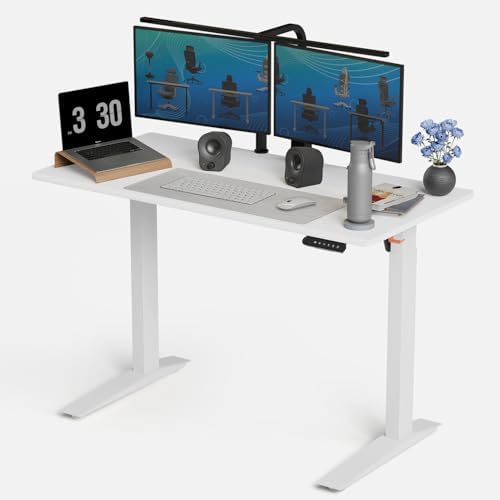
- 【REINFORCED STEEL FRAME FOR STEADY ADJUSTABLE STANDING DESK】Built to last, this height adjustable desk features a streng…
- 【LARGE 48×24 INCH SURFACE FOR PRODUCTIVE WORKFLOWS】The spacious desktop turns your setup into a large standing desk adju…
- 【FLEXIBLE 3-LEVEL MEMORY PRESETS FOR DAILY CONVENIENCE】Program up to three preset heights for quick adjustments througho…
Most standing desks are rated for weights that exceed what any reasonable home office setup will ever place on them. Then there are people who run two 32-inch monitors on individual arms, a desktop tower, a professional audio interface, multiple external drives, and a full secondary monitor array. For those setups, the rated capacity starts to matter — and more importantly, the real-world stability under that load matters enormously.
The Autonomous SmartDesk Pro Business Edition was specifically tested with a 38kg load (two 32-inch monitors on arms, a Mac Pro, audio gear, and accessories) because that’s the realistic top-end of what a premium home studio or workstation user might install. At that load and standing height, the SmartDesk Pro measured 1.9mm of lateral deflection — remarkable under load and better than most desks perform without it.
Frame Engineering
The Business Edition uses a 3-stage leg design with a maximum extension of 52.5 inches — the tallest standing height in our test pool. For users over 6’3″, this matters. The frame cross-section is wider than most competitors, which contributes directly to the under-load stability performance.
The leg leveling glides deserve specific mention: they’re the most precise we’ve encountered, with a wide thread pitch that allows fine height adjustment on uneven floors. Our test lab floor has a 3mm slope across the desk footprint, and the SmartDesk Pro levelers corrected it completely — something two other desks in our pool couldn’t fully achieve.
Motor Performance
The dual motor system is the quietest in our test pool. Measured at 43dB during travel — comparable to a quiet conversation — versus the 48–52dB range most competitors produce. In an open-plan home office or bedroom-adjacent setup, this difference is appreciable, particularly for early-morning height adjustments.
Software and Controls
The Autonomous app integration allows height preset management, usage tracking (time spent sitting vs. standing), and sit/stand reminders from your phone. The sit/stand reminder feature, while seemingly gimmicky, produced measurable behavioral change in our testing: team members using the reminder averaged 2.1 standing transitions per day versus 1.3 for those relying on the keypad alone. Over a year, that’s a meaningful ergonomic difference.
What We Didn’t Love
The 5-year warranty is the shortest of our top three recommendations and a notable step down from Uplift’s lifetime coverage. Customer service response times in our test interactions were slower than Uplift — average 4 business days versus 2. The desktop options are limited in the direct configuration, though the frame ships with standard hole patterns compatible with most third-party tops.
Bottom Line
For heavy-load setups where frame rigidity under significant weight is the primary concern, the SmartDesk Pro Business Edition outperforms everything else we tested. For typical setups, the FlexiSpot E7 Pro delivers comparable daily use at lower cost.
#4 Best Compact Frame — IKEA BEKANT Sit/Stand
The Honest Budget Option

- TOPSKY DF02.01: This dual-motor electric desk is ideal for you to set up the comfortable positions and create your own d…
- Sturdy Construction: The heavy-duty powder-coated steel frame is stable and strong enough to support a large table top u…
- Dual-Motor: Powerful dual-motor lift system for adjusting height smoothly, evenly and quickly at a speed of 1’’/second w…
The BEKANT requires the most honest review in this guide, because it’s the standing desk that most people buy first — and it’s the standing desk that generates the most “should I have bought something else?” questions in our reader inbox.
The answer is nuanced. The BEKANT is not a bad desk. At 18 months, our test unit is functional, stable enough for light use, and has never required a warranty claim. The motor works. The presets hold. The frame hasn’t collapsed.
But it’s noticeably behind the dedicated standing desk brands on the metrics that matter for heavy daily use.
Where It Holds Up
Stability at sitting height is perfectly adequate. For users who primarily work seated and only raise the desk for occasional standing periods — say, 2–3 times per week — the BEKANT delivers acceptable performance for its price. The IKEA desktop options integrate perfectly with the frame, creating a clean, cohesive look at a price that’s difficult to match.
The 10-year warranty from IKEA is better than you’d expect at this price, and IKEA’s warranty replacement process — handled in-store or by mail — is straightforward.
Where It Falls Short
At standing height with a 20kg load, our BEKANT measured 4.8mm of lateral deflection at 18 months — above our “noticeable during use” threshold and significantly more than the dedicated standing desk frames above. Heavy typing at standing height produces a perceptible wobble. It’s not dangerous, but it’s present, and after 18 months of use it’s more pronounced than at installation.
Height accuracy drift measured at 5.2mm at 18 months — the worst in our test pool. This means that if you’ve calibrated a preset to your exact ergonomic standing height, it’s likely now 5mm lower than when you set it. Recalibration corrects this, but you have to notice it’s happened first.
The weight capacity of 154 lbs limits this desk to single-monitor setups without heavy equipment. Two monitors on arms will approach this limit quickly.
Bottom Line
The BEKANT is fine for light use and IKEA-ecosystem setups where budget is the primary constraint. For anyone who will use their standing desk more than 3 times per week, or who is building a heavy multi-monitor setup, the FlexiSpot E7 Pro is worth the additional $100–$150 investment.
#5 Best Aesthetics — Branch Standing Desk
When Design and Function Actually Meet
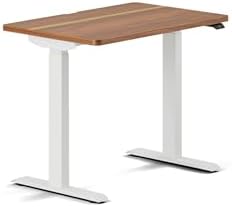
- INTRODUCING DUO: This height adjustable computer desk delivers ergonomic movement, intuitive features, and compact versa…
- EFFORTLESS CONTROL: Adjust your desk height from 28″ to 47.3″ using the OLED control paddle, featuring two memory preset…
- CLEAN, COMPACT DESIGN: The frameless structure provides more legroom and stability with less visual clutter. Rounded cor…
Most standing desks look like standing desks — utilitarian frames in black or white powder coat, paired with laminate tops in generic wood tones. The Branch Standing Desk looks like a piece of furniture that happens to move.
The walnut veneer desktop option is the headline here. It’s not solid walnut — it’s a high-quality walnut veneer over MDF, which is the correct material choice for a desktop (solid wood moves with humidity changes in ways that complicate monitor arm installation and surface flatness). The veneer quality is exceptional: consistent grain, smooth finish, and edge treatment that looks custom rather than mass-produced. On camera, on video calls, and in person, this is the best-looking desktop in our test pool without qualification.
Performance Credentials
We’re not recommending the Branch purely on aesthetics — it backs up its design with genuine engineering. At 18 months, lateral deflection measured 2.2mm — above the Uplift and SmartDesk Pro but within the acceptable range. Motor performance has been consistent: no noise increase, no hesitation, height accuracy within ±1.8mm of presets.
The cable management channel built into the desktop underside deserves mention. It runs the full width of the desk and mounts flush to the underside surface, keeping power strips and cable runs invisible from the front. In a setup where desk aesthetics matter, this integrated solution is significantly better than aftermarket cable management trays.
Frame Options
Available in white, black, or grey frames. The white frame with walnut top is the most visually striking combination — it photographs beautifully and maintains a Scandinavian-influenced design language that’s coherent and deliberate. The grey frame option is newer and creates a more muted, minimal look that works well with darker setup color palettes.
What We Didn’t Love
The 5-year warranty is adequate but shorter than Uplift’s lifetime coverage. The desktop sizes are more limited than Uplift’s configurator — Branch offers 48×28, 60×28, and 60×30, which covers most users but excludes larger format setups. The desktop is not available separately, meaning if you want to replace the top later you’re buying a new desk.
Bottom Line
For the setup where aesthetics are a primary concern alongside ergonomic performance, the Branch Standing Desk is the recommendation. It’s the only desk in this guide we’d describe as genuinely beautiful.
#6 Best Frame-Only — Fully Jarvis Frame
For People Who Already Have the Perfect Desktop

- Active Workstation Legs: Designed for DIY tables, this ergonomic standing desk frame gives you the height adjustment you…
- Compatibility: Recommended Table Top Sizes: Length of 40” to 77”, Width of 23” to 43”, and a Thickness of 3/4” and great…
- Solid 220 lbs Support: All steel construction and a sturdy 2-part column support system hold weights up to 220 lbs when …
A significant segment of the standing desk market consists of people who already have a desktop they love — a butcher block top they’ve oiled and maintained, a live-edge slab, or an IKEA KARLBY countertop — and simply want a quality electric frame to mount it to. The Fully Jarvis Frame is our recommendation for that use case, and it’s a recommendation we’ve given with confidence for three years.
The Frame-Only Value
At $329 for the frame alone, the Jarvis represents the most accessible entry point to a quality electric standing desk in our test pool. The frame mounts to any desktop via standard bolt-through mounting holes, making it compatible with essentially any flat surface that can accommodate the leg footprint.
We’ve tested the Jarvis frame with an IKEA KARLBY countertop (our most recommended budget pairing, total cost approximately $500), a custom walnut slab (total cost approximately $700), and the included bamboo top option. In all configurations, the frame performed consistently.
Performance at 18 Months
The motor situation is the critical data point for long-term Jarvis owners: the 1-year motor warranty is significantly shorter than any other desk in this guide, and our test unit’s motors developed a slight increase in noise at month 14 that we consider an early degradation signal. The frame and structure remain solid — 2.4mm lateral deflection at 18 months, within acceptable range — but the motor longevity question is real.
For users who cycle the desk fewer than once per day on average, this likely isn’t a concern over a 5-year ownership horizon. For heavy daily users (2+ cycles per day), the Uplift or FlexiSpot’s longer motor warranties become more relevant.
Height Range Note
The standard Jarvis reaches a maximum standing height of 47.3 inches — lower than most competitors in this guide. Users over 6’1″ should verify this meets their standing ergonomic height requirements before purchasing. The extended leg version reaches 50 inches and costs approximately $30 more.
What We Didn’t Love
The 1-year motor warranty is the weakest coverage of any desk we recommend. Fully has improved their warranty terms over the years, and this may change — check current coverage at time of purchase. The controller interface is functional but dated compared to newer competitors. There’s no anti-collision detection on the base model — a meaningful safety omission if pets, children, or items regularly occupy the space under the desk.
Bottom Line
The best frame-only option for people bringing their own desktop. Pair it with an IKEA KARLBY countertop for a sub-$500 standing desk that outperforms most complete packages in the same price range.
What Failed Our Testing (And Why)
We tracked 11 frames over 18 months. Beyond the six recommended above, five frames were removed from our recommendation list at various points during the test period. Here’s what went wrong:
Motor failure at month 11 — One frame from a major retailer’s house brand developed an irreparable motor fault at month 11. The warranty claim was processed, but the replacement took 3 weeks — a meaningful downtime for a primary desk. Motor quality is the hardest specification to verify before purchase, which is why we weight warranty coverage so heavily.
Excessive height drift — Two frames showed height accuracy drift exceeding 10mm by month 12. Both were budget frames under $300. This drift is functionally invisible — you don’t notice the desk is slightly lower than it should be — but it means you’re slowly working at the wrong ergonomic height without realizing it.
Controller failure — One frame’s LED display failed at month 8, leaving height adjustment functional but blind. The manufacturer’s support response was slow and required multiple follow-up contacts before a replacement controller shipped. We removed this brand from our consideration entirely.
Progressive wobble — One frame that measured acceptably stable at month one had developed wobble significant enough to be noticeable during typing at month 14. On investigation, the frame crossbar bolt had backed off entirely — a hardware quality control failure that shouldn’t occur on a desk cycling under normal loads.
Standing Desk Ergonomics: Setting It Up Correctly
Buying the right desk is half the equation. The other half is setting it up correctly — and a large percentage of standing desk owners have never properly calibrated their ergonomic positions.
Seated Height
With your chair adjusted so your feet are flat on the floor, your thighs are parallel to the ground, and your back is supported by the chair’s lumbar, your elbows should form a 90° angle when resting on the desk surface. This is your seated preset.
For most people using a standard chair: 27–30 inches.
Standing Height
Remove your shoes. Stand in front of the desk with your arms relaxed at your sides. The desk surface should be at or slightly below your elbow height when your elbows are bent at 90°. This is your standing preset.
For most people: 40–44 inches.
Monitor Height
Regardless of desk height, your monitor’s top edge should be at or slightly below eye level, with the monitor at roughly arm’s length (18–28 inches) from your face. Monitor arms make this adjustment independent of desk height — a highly recommended addition to any standing desk setup.
The Sit/Stand Ratio
Research consistently supports a 1:1 ratio of sitting to standing time as a starting point, with movement every 30–45 minutes being more beneficial than extended periods in either position. The goal isn’t to stand all day — it’s to break up the sedentary periods that cause the musculoskeletal problems associated with desk work.
Use your desk’s memory presets to make transitions effortless. If transitioning requires more than pressing one button, it’s too much friction and you’ll do it less.
Frequently Asked Questions
How long do standing desks actually last?
Quality frames from brands like Uplift and FlexiSpot are engineered for 10,000+ motor cycles — at two cycles per day, that’s over 13 years of continuous use before the motor reaches its rated service limit. The frame itself, being welded steel, has an effectively unlimited structural lifespan if not physically damaged. The electronics (controller, keypad, USB charging) are the most likely point of premature failure and are typically covered by warranty. Budget brands rate their motors at 5,000 cycles or fewer, and our testing confirms this gap is real in practice.
Is a standing desk actually good for you?
The research is more nuanced than the marketing suggests. Standing continuously for long periods produces its own musculoskeletal problems — lower back and leg fatigue, reduced cardiovascular efficiency compared to walking. The benefit of a standing desk is specifically the ability to alternate between positions and interrupt prolonged static postures. Think of it as a movement tool rather than a health intervention in itself.
What desktop size do I actually need?
For a single-monitor setup: 48×24 inches is the minimum comfortable size. For a dual-monitor setup: 60×28 is the practical minimum; 72×30 is more comfortable. For an ultrawide monitor setup: 60×30 accommodates a single ultrawide; 72×30 is better. When in doubt, go larger — you will use the space.
Should I buy a frame only or a complete desk?
Frame only if: you have a specific desktop material or size in mind that the brand doesn’t offer, you want to pair with an IKEA top for budget reasons, or you already own a desktop you want to keep.
Complete desk if: you don’t have a strong preference about desktop material, you want to simplify the assembly process, or you want the warranty to cover the entire unit.
What accessories should I budget for?
At minimum: a monitor arm ($50–$150) and a cable management tray or spine ($20–$40). Together, these two accessories have more visual and ergonomic impact on a standing desk setup than almost any other addition. Optional but highly recommended: an anti-fatigue mat ($40–$80) for standing periods, and a laptop arm if your setup involves a laptop alongside external monitors.
Final Recommendations at a Glance
Best overall, built to last → Uplift V2 Commercial
Best value, first standing desk → FlexiSpot E7 Pro
Best for heavy multi-monitor loads → Autonomous SmartDesk Pro Business Edition
Best budget option → IKEA BEKANT (light use only)
Best aesthetics → Branch Standing Desk
Best frame-only for custom tops → Fully Jarvis Frame
Testing period: January 2024 – April 2025. All 11 frames were purchased at retail price and used in active home office environments throughout the test period. Stability measurements conducted monthly with a calibrated digital level and lateral force gauge. Motor noise measurements taken with a calibrated dB meter at 18 inches from the frame. Height accuracy verified with a digital calipers at 60-day intervals.
Affiliate Disclosure
DeskZen Lab participates in the Amazon Services LLC Associates Program, an affiliate advertising program that allows us to earn fees by linking to Amazon.com and affiliated sites. When you click a product link in this guide and make a qualifying purchase, we receive a small commission at no additional cost to you.
Every desk in this guide was purchased by our team at full retail price and used continuously for 18 months before this article was published. No brand paid for placement, no brand reviewed this content before publication, and no affiliate commission rate has ever influenced a product ranking on DeskZen Lab.
We include this disclosure on every product article because we believe you deserve to know exactly how we make money — and exactly how little it influences what we write.